Setting or Unsetting Property Breakpoints
Property breakpoints can be set to halt execution when the property of a specific object changes. Property breakpoints can be set only while in the debugger.
To set a property breakpoint, an object must be specified and one or more properties selected from the list of properties defined on the class, including any inherited properties. Property breakpoints can be set on any primitive type property or object reference.
Property breakpoints cannot be set on exclusive collections.
To set or unset a breakpoint while in the debugger:
-
Select the Add Property Breakpoint command from the Breakpoints menu.
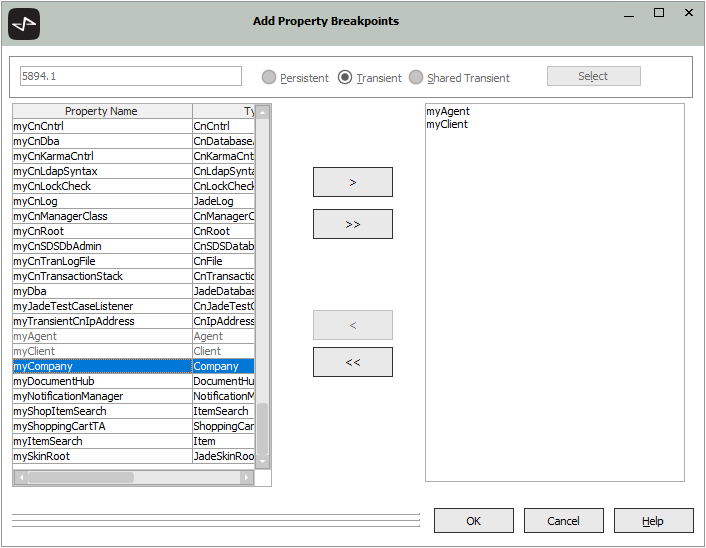
The Add Property Breakpoints dialog is then displayed, as shown in the following image.
-
In the text box at the upper left of the dialog, enter the oid of the target object.
-
Select the required lifetime (for example, persistent or transient) option button at the right of the text box.
-
Click the Select button. The list of properties on the class, including superclasses, is then displayed in the list at the left of the dialog.
-
Select one or more properties from the list and then click the > button or double-click on a single property to move the property to the list at the right of the dialog.
Alternatively, if you want to set breakpoints on all properties in the class, click the >> button to move all properties from the list at the left to the list of selected properties at the right of the dialog.
-
Remove a breakpoint from the class by selecting the property in the list at the right of the dialog and then click the < button.
Alternatively, if you want to remove breakpoints from all properties in the class, click the << button to move all properties from the list of selected properties at the right to the list of properties at the left of the dialog.
-
Click the OK button to enable the selected property breakpoints.
The Add Property Breakpoints dialog can also be displayed from the Local Variables window by selecting a local variable that contains a non‑null object reference, right‑clicking, and then selecting the Add Property Breakpoint command from the Breakpoints menu. The Add Property Breakpoints dialog that is then displayed contains the oid of the variable. You can select one or more properties from the list of properties.
To avoid entering the oid manually, select a variable from the Local Variables window and use the Add Property Breakpoint command. For details, see "Viewing local Variables and Parameters" and "Inspecting and Modifying Values", elsewhere in this chapter.
2025 R2 and higher

