Viewing Local Variables and Parameters in the Debugger
The Local Variables window enables you to monitor or detect changes to local variables and parameters used in your methods.
To display the Local Variables window if it is not already displayed
-
Select the View menu Local Variables command.
The Local Variables window automatically monitors all parameters and local variables in your methods. Use the Watches window to reduce the number of variables that are monitored.
The Local Variables window, shown in the following image, displays the values of all local variables in your methods. As your code executes, the values of the items change and the Local Variables window is updated.
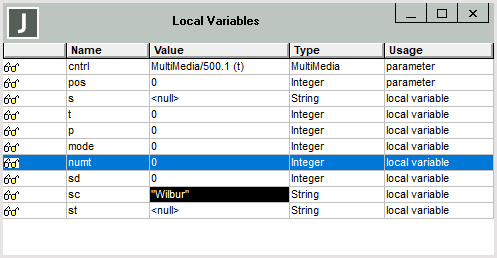
To better display longer and multiple line values, you can resize the Local Variables window. For each local variable or parameter, the name, value, usage, and type of the item are displayed.
For each local variable or parameter, the name, value, usage, and type of the item are displayed. The value that is displayed is:
-
The current value of the variable, if the item is a primitive type
-
An oid, if the variable contains an object reference
-
<null>, if the variable has no value assigned to it
-
[Out of scope], if the variable is not within the scope of the method currently selected in the Call Stack window, or it is declared but not used in the method currently selected in the Call Stack window
Local variable values being watched are highlighted when they change.
Position the cursor over a local variable in a line of code in the Method Source window to display the current value of that item in bubble help. (For details about the circumstances under which bubble help is displayed by default, see "Displaying Code in the Method Source Window", earlier in this chapter.)
By default, the variables and parameters in the Local Variables window are displayed in the order in which they appear in the method. You can sort the table of displayed variables by clicking on the fixed column cell of the table. Clicking in the fixed part or a column causes the entries to be displayed alphabetically sorted (case‑insensitive) by that column for the rest of the debugger session. For example, clicking on an identifier in the Name column sorts the list by identifier name. Clicking the sorted fixed column cell again inverts the sorted list.
As the methods are selected, the Local Variables list is updated to reflect the values that are within the scope of the selected method. If no method is selected, the values are displayed for the method that is currently executing. You can watch:
-
Method parameters
-
Local variables
You can inspect or modify variables selected in the Local Variables window. For details, see "Inspecting and Modifying Values", later in this chapter.

