Using Conditional Breakpoints and Pass Counts
The Breakpoints window in the Jade Debugger includes:
-
An indicator that shows whether the breakpoint is enabled.
-
The method name and line number for the breakpoint.
-
The source of any associated condition.
To specify options for the selected breakpoint
-
Right‑click on a selected breakpoint in the Breakpoints window.
-
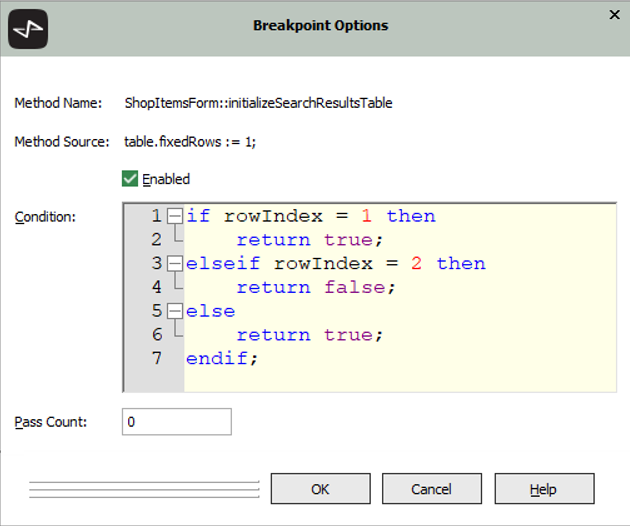
From the popup menu that is then displayed, select the Options command. The Breakpoint Options dialog, shown in the following image, is then displayed.
-
Check the Enabled check box if you want to disable the current breakpoint. (Conversely, if the selected breakpoint is currently disabled, check the Enabled check box to enable that breakpoint.)
The Jade Debugger never halts execution at a disabled breakpoint.
Enabled breakpoints are displayed in the first column of the Breakpoints window with a filled circle and disabled breakpoints with an empty circle. Clicking on a filled circle removes the breakpoint; clicking on an empty circle enables a disabled breakpoint.
-
In the Condition
A condition can be:
-
Any
-
One or more
if indx = 13 then
    return true;
elseif indx = 1 and cust.number = 345 then
    return true;
else
    return false;
endif;
This condition must begin with the conditional if instruction.
All branches must return a Boolean value.
The Condition control allows for multiple‑line input. In addition, the Condition control box also provides AutoComplete functionality. If AutoComplete functionality is enabled, you are provided with the usual prompts when the text is entered. The local parameters, local variables, and local constants for the method in which the breakpoint is defined are pre‑loaded in AutoComplete for the entry of the condition. The condition logic expects a Boolean return value.
The scope of the condition for a property breakpoint is the class of the receiver. The condition must be a valid Boolean expression using either properties or methods defined within the class hierarchy of the receiver, type methods, or properties or methods defined on environmental objects; for example, app, global, and so on.
The condition source is validated when it is entered. If the enclosing method is subsequently recompiled, the breakpoint is marked for revalidation the next time it is encountered. If it is found to be invalid, the Jade Debugger stops execution at the breakpoint and disables it.
-
-
In the Pass count text box, specify the number of times that the breakpoint is passed before execution halts. The pass count is decremented each time the breakpoint is reached and the Jade Debugger stops when the count reaches zero (0).
-
Click the OK button. Your breakpoint options are saved if the Save Breakpoints check box is enabled in the Exit sheet of the Preferences dialog (accessed from the Options menu Preferences command). Alternatively, click the Cancel button to abandon your selections.
Breakpoint options (for example, disabling a breakpoint or specifying and changing conditions) can be specified or changed by using the Jade Debugger

