Modifying Values in the Debugger
Use the Inspect command from the Variables menu to display or modify the value of a primitive item or to inspect an item containing an object reference.
Only local variables or parameters that contain a primitive type value can be modified.
To inspect the value of an item
-
Select the:
-
Local Variables window, right‑click, and then select the Inspect command from the popup menu.
-
Watches window, right‑click, and then select the Inspect Watch command from the popup menu.
The Variable Inspector dialog, shown in the following image, is then displayed.
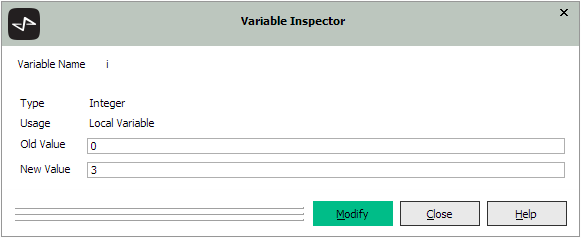
The name, type, and current value of the selected item is displayed.
The Modify button is enabled only if it is valid to change the variable value.
-
-
To modify the value of the variable associated with the current method that is executing in the debugger:
-
In the New Value text box, specify the new value for the selected primitive type variable. The type of value that you specify must be the same as that of the selected value; for example, you cannot change the value of a numeric variable to a string value.
-
Click the Modify button. Alternatively, click the Close button to abandon the modification and close the dialog.
-

