Displaying the Current Exception Handler Stack
The Exception Handler Stack message box enables you to view all exception handlers armed by the receiving process in the current node.
To display the current exception handler stack
-
Select the View menu Show Exception Handler Stack command.
The Exception Handler Stack message box, shown in the following image, is then displayed.
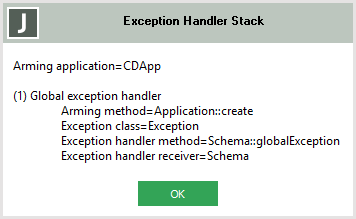
The exception handler stack displays:
-
The name of the application that is arming the exception handlers.
-
For each armed exception handler, the following information is displayed.
-
The exception handler stack depth (the handlers at the top of the stack are invoked first)
-
Whether the exception handler is a global or a local exception handler
-
The name of the class and method that armed the exception
-
The name of the exception class for which the handler is raised
-
The name of the class and method of the exception handler method
-
The name of the class of the exception handler receiver
-

