ISO 8601 Date and Time Support
Jade supports the ISO 8601 format (specified in https://www.rfc-editor.org/rfc/rfc3339), MicrosoftDateFormat (specified in https://learn.microsoft.com/en-us/dotnet/standard/base-types/standard-date-and-time-format-strings), and Jade style format for Date, Time, TimeStamp, and TimeStampOffset primitive types returned from a web service (in addition to the default generic timestamp parsing behavior). For details about the Jade style format, see "
This feature is not used in dynamic parsing. Timestamps are represented by strings, as they are in JSON RFC8259 format.
Enable the ISO 8601 format for responses from your REST web application by checking the Use ISO 8601 Time check box on the Web Options sheet of the Define Application dialog. This check box is unchecked by default.
The ISO 8601 format
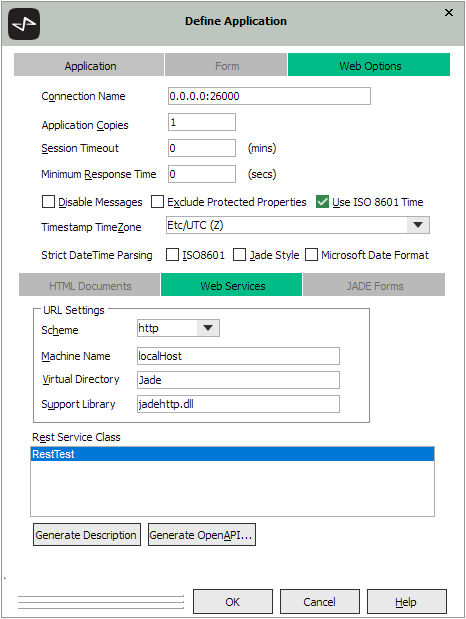
When the Use ISO 8601 Time check box is checked, the application formats all Date, Time, TimeStamp, and TimeStampOffset primitive types in ISO 8601 format rather than MicrosoftDateFormat.
In addition, when a TimeStamp is returned from the web service in ISO 8601 format, it includes time zone offset information, similar to a TimeStampOffset. This is required because the consumer of the web service would not otherwise know the time zone to which the TimeStamp is local. As such, all TimeStamp primitive types are converted to UTC time and an offset included that represents by how many hours and minutes to offset the TimeStamp to get to local time.
You can specify the time zone that should be assumed for TimeStamp primitive types by typing or selecting the appropriate time zone IANA name (and UTC offset) from the Timestamp TimeZone combo box on the Web Options sheet of the Define Application dialog. The combo box is populated with Etc/UTC (Z) as well as the time zone in which the database server is located. You can select any time zone you require, by typing it in full.
To enforce strict parsing of times and dates, check one or more of the following check boxes in the Strict DateTime Parsing group.
-
ISO8601, to enforce strict parsing of ISO 8601 format dates and times. The default value is false.
-
Jade Style, to enforce strict parsing of strict parsing of dates and times in the format Jade uses. The default value is false.
-
Microsoft Date Format, to enforce strict parsing of MicrosoftDateFormat format dates and times. The default value is false.
The
2022.0.01 and higher

